How to Select Restaurant Reservation Software for Smoother Daily Operations

October 23, 2026 · 25 reads
Introduction
Running a restaurant means handling many tasks at once. Staff answer booking calls, welcome walk-in guests, assign tables, and manage changes. During busy hours, even a small mistake can create confusion. Guests may wait longer, staff may lose track of bookings, and tables may remain unused.
Restaurant reservation software helps teams organize these tasks in one place. It can support online bookings, table assignments, guest arrivals, and waitlist management. However, every restaurant has different needs. A small cafe may need a simple booking tool, while a busy restaurant may require detailed floor plans and stronger staff coordination.
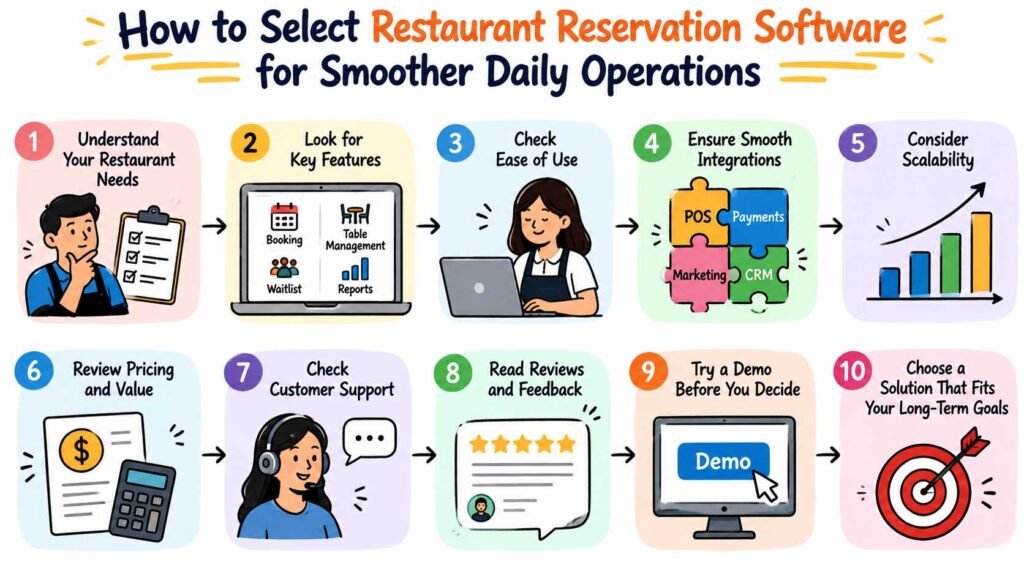
Choosing the right system starts with understanding your daily challenges. You should compare features, ease of use, costs, staff needs, and future plans. This guide explains what to look for and how to make a practical choice.
1. Start With the Problems You Want to Solve
Before comparing software, review how your restaurant handles reservations today. A clear picture of your current process will help you identify the features that matter most.
For example, your team may record bookings in a notebook. Staff might then transfer those details to a spreadsheet or communicate them through messages. This approach can work for a small number of bookings, but it becomes harder to manage as demand grows.
Write down the problems that occur most often. Consider missed calls, duplicate bookings, unclear table assignments, long waits, and poor communication between shifts.
Use these questions to guide your review:
- Do guests need an easier way to book tables?
- Does your team struggle to track available tables?
- Do hosts find it hard to manage walk-in guests?
- Do staff receive frequent booking changes?
- Does your restaurant need a better way to manage waiting guests?
- Do managers need clearer reports about daily operations?
Your answers will help you separate essential features from optional ones. This step also prevents you from paying for tools your team may never use.
2. Examine the Booking Experience From the Guest’s Side
A reservation system should make booking simple for guests. If the process feels confusing, people may call your restaurant instead or leave without completing their booking.
Look for a booking page that clearly displays available options. Guests should understand how to select a date, choose a time, enter the required details, and submit their request.
Online booking pages
Online booking lets guests request tables without calling during service hours. This can help restaurants accept reservations while staff focus on customers inside the dining room.
Check whether the booking page works well on mobile devices. Many guests use their phones to search for restaurants and arrange meals. A clear mobile experience can make the process easier.
Direct booking options
A direct booking system gives restaurants a way to accept reservations through their own booking pages. This can reduce dependence on third-party dining marketplaces for the bookings guests make directly.
However, a booking page alone cannot guarantee more reservations. Restaurants still need accurate availability, clear policies, and a convenient guest experience.
Reservation confirmations
Guests should receive clear information about their booking status. Check how the system handles confirmations and whether it provides confirmation codes or other booking references.
A good confirmation process helps guests and staff identify the correct reservation. It also gives the restaurant a clearer record when someone asks about a booking.
3. Check How the Software Handles Tables
Booking a table involves more than recording a guest’s name. Staff must match party sizes with available tables and account for the restaurant’s physical layout.
Restaurant table management software helps teams organize these decisions. Before selecting a system, check whether it supports the way your dining room operates.
Table availability
The system should help staff understand which tables are available, occupied, reserved, or awaiting guests. Clear table status reduces confusion during busy periods.
For example, a party of four may arrive while another table for four remains occupied. Staff need an accurate view of current seating before making another reservation.
Floor plan management
A digital floor plan shows the restaurant’s table arrangement. It helps hosts understand where each table sits and how the dining room operates.
Look for a floor plan that reflects your real layout. Check whether the system supports your table sizes, seating areas, and usual table combinations.
Table combinations
Some restaurants join smaller tables to accommodate larger groups. Your software should support this process if your team regularly changes table arrangements.
Staff must also understand when combined tables become available again. Otherwise, a reservation may block seating that the restaurant could use more effectively.
Dining duration
Restaurants often estimate how long different parties will occupy their tables. A reservation system should support the planning process in a way that fits your service style.
Avoid relying on estimates alone. Guests may finish early or stay longer than expected. Staff should review actual table status before promising the same table to another party.
4. Compare the Features That Support Daily Service
Not every restaurant needs the same set of tools. Compare software based on the tasks your team performs each day.
| Feature | What It Helps Your Team Do | What to Check |
|---|---|---|
| Online booking | Accept reservations through a booking page | Booking steps and mobile usability |
| Direct booking | Receive bookings through restaurant-controlled channels | Availability settings and booking policies |
| Reservation confirmations | Give guests a booking reference | Confirmation process and booking details |
| Table management | Track table status and assignments | Accuracy and ease of updates |
| Floor plan software | View the dining room layout | Support for your actual table arrangement |
| Waitlist management | Record guests waiting for tables | Wait estimates and status updates |
| Walk-in management | Organize guests without reservations | How staff add and seat walk-ins |
| Host stand tools | Coordinate arrivals and seating | Ease of use during busy service |
| Staff access controls | Give team members suitable access | Available roles and permissions |
| Operational reports | Review booking and service activity | Report details and usefulness |
Use this table as a starting point, not a fixed checklist. Your final selection should reflect your restaurant’s size, service style, booking volume, and staff responsibilities.
5. Find Out Whether the System Can Handle Walk-Ins and Waitlists
Advance reservations represent only part of restaurant demand. Many guests arrive without booking, especially at cafes, casual dining venues, and restaurants in busy areas.
Your software should help staff manage these visitors without losing track of existing reservations.
Walk-in management
Walk-in management lets staff record guests who arrive without a reservation. It helps the team organize seating decisions and understand which parties still need tables.
For example, a host may welcome a group of three while several tables remain occupied. The host can record the party and review its status instead of relying on memory.
Waitlist management
A waitlist helps staff track guests who cannot sit immediately. The system should make it easy to add a party, update its status, and identify when seating becomes available.
Estimated waiting times require care. Staff should consider current table occupancy, party size, and expected turnover before giving guests an estimate.
Managing both reservation types
Reservations and walk-ins compete for the same seating capacity. Your team needs a clear view of upcoming bookings and current demand.
A practical workflow might look like this:
- Staff review upcoming reservations before service.
- The host records walk-in parties as they arrive.
- The team checks table availability and party size.
- Staff update the waitlist when the situation changes.
- The host assigns tables when they become available.
- Staff update the table status after seating guests.
This process works best when everyone follows the same rules. Software can support coordination, but staff must keep records accurate.
6. Make Sure the System Fits Your Staff
Even useful software can cause problems when employees struggle to use it. Restaurant teams often work under time pressure, so the main tasks should feel clear and straightforward.
Ask staff to test the system before you make a final decision. Have them create a booking, change a reservation, seat a walk-in, and update a table’s status.
Watch how long each task takes. Notice where employees hesitate or ask for help. These small observations can reveal problems that a sales demonstration may not show.
Check staff access controls
Different employees may need different permissions. A host may need to manage reservations, while a manager may need access to broader operational information.
Role-based access can help restaurants organize staff permissions. Before choosing a system, confirm which roles it supports and whether those options match your team’s responsibilities.
Review language options
Restaurants that serve international guests or employ multilingual teams may benefit from multilingual interfaces. Check the available languages and make sure the interface suits the people who will use it.
Do not assume that every language option covers every screen or workflow. Test the parts your staff will use most often.
Plan staff training
Set aside time to train employees before the system becomes part of daily service. Give staff clear instructions for common tasks and explain who handles booking changes or system problems.
A short practice session can prevent confusion during peak hours. Managers should also review the process after launch and answer questions as they arise.
7. Understand Reports and Operational Visibility
Restaurant managers need reliable information to make daily decisions. Operational reporting can help teams review booking activity and understand patterns in restaurant operations.
Before selecting a system, examine its reports. Ask which information it records, how staff can access it, and whether the reports answer useful business questions.
Consider reviewing the following areas:
- Reservation activity: Understand how many bookings the restaurant receives.
- Booking changes: Review cancellations and reservation updates when the system records them.
- Guest arrivals: Examine arrival patterns if the software captures this information.
- Table activity: Review available table information when the system provides it.
- Operational trends: Look for patterns that may help with staffing and service planning.
Do not assume every reservation system offers all these reports. Confirm the available data before you rely on it.
Reports also need context. A quiet Tuesday may differ from a busy Saturday because of local events, weather, seasonality, or other factors. Use reports to support decisions rather than treating one day’s results as a complete picture.
8. Evaluate Cost, Limits, and Future Needs
Price matters, but the cheapest system may not offer the best value. A low-cost option can still create extra work if it lacks the features your restaurant needs.
Compare the full cost of using each system. Ask about subscription fees, setup charges, staff training, payment terms, and any costs for additional features. If the provider does not publish a detail, request clarification rather than guessing.
Free access also needs careful review. Some providers offer a pilot program or a limited free option. Check which features you can use, how long access lasts, and whether any restrictions apply.
| Evaluation Area | Questions to Ask | Why It Matters |
|---|---|---|
| Starting cost | Does the provider charge setup fees? | Helps you estimate the initial expense |
| Ongoing cost | What recurring charges apply? | Helps you plan your budget |
| Feature access | Which tools come with the selected plan? | Prevents unexpected limitations |
| Booking limits | Does the plan restrict booking volume? | Helps you assess suitability during busy periods |
| Staff access | Are there limits on users or roles? | Helps you plan team access |
| Support | What help can you receive, and when? | Helps you prepare for operational issues |
| Future changes | Can the system support your expected growth? | Reduces the risk of an early replacement |
A growing restaurant may eventually need different tools from a small cafe. Think about likely changes in booking volume, staff size, and service style. Choose a system that meets your current needs without creating avoidable problems later.
9. Test the Software Before You Commit
A product demonstration can explain the main features, but hands-on testing reveals how the software works in practice.
If the provider offers a trial or pilot, use it to test your normal workflows. Confirm the available terms before you begin, because trial periods and feature access can vary.
Use a realistic test plan.
Test one: Create a reservation. Enter a sample booking and review the confirmation process.
Test two: Change a booking. Update the date, time, or party size and check whether the system reflects the change correctly.
Test three: Assign a table. Select a suitable table and confirm that the status matches the booking.
Test four: Add a walk-in. Record a guest who arrives without a reservation and review the available seating options.
Test five: Manage a waitlist. Add a party, update its status, and review how staff identify the next available table.
Test six: Review staff access. Check whether each team member can access the tasks required for their role.
Test seven: Review reports. Open the available reports and confirm that they provide useful information.
Record the results. Ask staff what felt easy, what caused confusion, and which missing features would create daily problems.
10. Avoid These Common Selection Mistakes
Restaurants can waste time and money when they choose software without checking how it fits their operations. Watch for these common mistakes.
Mistake 1: Choosing Based Only on Price
A low price does not guarantee a suitable system. Compare the features, limits, and ongoing costs before making a decision.
Mistake 2: Ignoring Staff Feedback
Managers may like a system that employees find difficult to use. Include the people who handle reservations and seating in the evaluation.
Mistake 3: Overlooking Walk-In Guests
A restaurant that accepts walk-ins needs a clear way to manage them. Check this workflow even if advance reservations drive most bookings.
Mistake 4: Forgetting the Floor Plan
A system may record bookings but still fail to support your seating arrangement. Test the floor plan against your actual dining room.
Mistake 5: Assuming Every Feature Comes With the Plan
Providers may limit certain tools by plan, account type, or pilot terms. Confirm exactly what your restaurant can access.
Mistake 6: Skipping Staff Training
Employees need time to learn new processes. Train the team before relying on the system during a busy shift.
Mistake 7: Trusting Reports Without Checking the Data
Incorrect or incomplete records can lead to poor decisions. Review data quality and understand what each report measures.
Mistake 8: Ignoring Booking Policies
Software cannot replace clear rules for cancellations, late arrivals, and large parties. Define your policies and make sure staff can explain them to guests.
Mistake 9: Failing to Test Busy-Period Workflows
A system may feel easy when staff handle one booking at a time. Test several realistic tasks in sequence to see how the team manages pressure.
Mistake 10: Selecting Tools Without a Clear Goal
More features do not always mean better results. Choose software that solves real operational problems instead of collecting unnecessary tools.
11. How DineGlobe Fits Into the Evaluation Process
DineGlobe is a restaurant reservation software platform designed to help restaurant owners and hospitality teams manage bookings, table allocation, guest arrivals, waitlists, and front-of-house operations.
Its supplied product description includes online booking pages, direct restaurant booking, table management, floor plan tools, waitlist management, host stand workflows, walk-in management, reservation confirmations, role-based staff access, and operational reporting. It also identifies multilingual interfaces in English, Japanese, and Arabic.
These capabilities may be relevant to restaurants that want to organize reservations and seating activities in one place. However, you should confirm which features are currently available for your account and whether they match your specific workflow.
DineGlobe’s supplied description also mentions a pilot program that offers free access to available booking, table management, waitlist, and operational features. Check the current pilot terms and feature limits before making a decision. Do not assume that every feature remains free or that the same terms apply to every restaurant.
Use the same evaluation process for DineGlobe that you would use for any other system. Test the workflows, ask about limitations, and involve your staff before choosing a solution.
12. A Practical Decision Checklist
Before you select a reservation system, review your priorities and compare your shortlisted options.
Use the checklist below during a demonstration, trial, or pilot.
| Requirement | Your Review |
|---|---|
| Simple online booking | Can guests complete a booking easily? |
| Clear confirmations | Can guests and staff identify reservations? |
| Accurate table tracking | Can staff view and update table status? |
| Useful floor plans | Does the layout match your restaurant? |
| Walk-in support | Can staff record and seat walk-in parties? |
| Waitlist controls | Can the team track waiting guests? |
| Staff permissions | Can you assign suitable access? |
| Useful reports | Does the system provide information you need? |
| Clear pricing | Have you confirmed all relevant charges? |
| Staff readiness | Can employees use the system confidently? |
| Suitable support | Do the support terms meet your needs? |
| Future suitability | Can the system meet your likely needs as you grow? |
Give the most important requirements greater weight. For example, a restaurant with frequent walk-ins may prioritize waitlist and table management tools. A restaurant that receives many online bookings may focus more on booking pages and reservation confirmations.
The best choice should support your daily work without adding unnecessary complexity.
Frequently Asked Questions
1. What does restaurant reservation software do?
Restaurant reservation software helps restaurants record and manage table bookings. Depending on the system, it may also support booking confirmations, table assignments, floor plans, waitlists, and walk-in guests. The exact features vary by provider, so review the available tools before choosing a system.
2. Can small restaurants benefit from reservation software?
Yes. Small restaurants can use reservation software to organize bookings and reduce manual recordkeeping. However, they should choose a system that fits their booking volume and staff capacity. A simple tool may suit a small cafe better than a complex platform with features the team rarely uses.
3. Why should restaurants offer online booking?
Online booking gives guests a convenient way to request tables without calling the restaurant. It can also help staff manage bookings outside busy service periods. Restaurants still need accurate availability, clear booking policies, and a process for handling changes or special requests.
4. What is the difference between reservation software and table management software?
Reservation software focuses on recording and managing bookings. Table management software focuses on seating assignments, table availability, and dining room organization. Some platforms combine both functions, which can help staff connect reservations with the restaurant’s actual seating capacity.
5. Does reservation software manage walk-in guests?
Some systems include walk-in management tools, while others focus mainly on advance bookings. If your restaurant welcomes guests without reservations, confirm that the software supports this workflow. Test how staff add walk-ins, assign tables, and update guest status during service.
6. How does waitlist software help restaurant staff?
Waitlist software helps staff record guests who must wait for tables. It can make party status easier to track and help hosts organize seating as tables become available. Staff should still provide realistic waiting estimates and update the waitlist when restaurant conditions change.
7. What should restaurants check before paying for software?
Restaurants should review the price, available features, booking limits, staff permissions, support terms, and any extra charges. They should also test common tasks with employees who will use the system. A hands-on evaluation can reveal practical problems that a feature list alone may not show.
8. Is free restaurant reservation software enough?
A free option may suit a restaurant with basic needs, but the answer depends on its limits. Some providers restrict features, booking volume, support, or access periods. Review the current terms carefully and check whether the system can handle your restaurant’s normal workload.
9. How long does it take to train restaurant staff?
Training time depends on the software, the number of employees, and the complexity of your workflow. Staff may learn basic booking tasks quickly, but table management and reporting may require more practice. Use sample reservations, walk-in scenarios, and table changes to help employees build confidence.
10. How can a restaurant choose the right reservation system?
Start by listing your main operational problems and essential features. Compare suitable systems, review total costs, and test realistic workflows with your staff. Choose the option that supports your booking process, seating arrangement, and future needs without adding unnecessary complexity.
Conclusion
Selecting restaurant reservation software requires more than comparing feature lists. You need a system that fits your booking process, seating layout, staff skills, and budget. Start by identifying your main problems, then test the tools that can solve them. Pay close attention to table management, online booking, waitlists, walk-ins, staff access, and reporting. Confirm pricing and feature limits before you commit. Most importantly, let your team test the system with realistic restaurant tasks. DineGlobe offers several tools related to reservations and front-of-house operations, but you should verify current availability and terms. A careful evaluation can help you choose software that supports smoother service and more organized daily operations.
Leave a Reply