Simple Career Steps for DevOps and Modern Engineering DevOpsSchool

September 30, 2026 · 28 reads
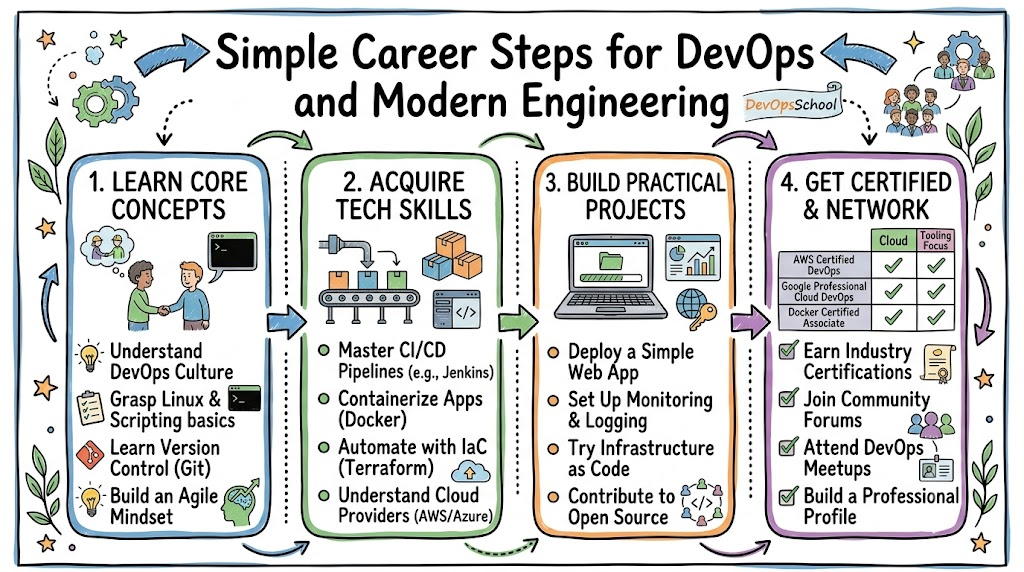
Introduction
Many people want to learn DevOps but do not know where to begin. The field has many skills, tools, and career choices.
A clear plan can make learning much easier. You can start with simple skills and add new ones over time.
DevOps connects development, testing, cloud, automation, and system work. So, learners need both knowledge and practice.
A good DevOps roadmap gives you a clear learning order. It can also help you choose skills that match your career goal.
DevOpsSchool gives learners a structured place to explore these areas. It covers DevOps, SRE, cloud, platform engineering, and related engineering fields.
The best approach stays simple. Learn one topic, practice it, build something, and then move forward.
Start With the Basics
Strong basics make advanced DevOps work easier. Start with Linux, Git, networking, and basic scripting.
Linux helps you understand servers and system tasks. Git helps you manage code and track changes.
Networking helps you understand how systems communicate. Scripting helps you automate repeated tasks.
These skills form the base of a useful DevOps learning path.
A Simple Starting List
New learners can focus on these areas first:
- Linux commands
- Git basics
- Networking basics
- Shell scripting
- Python basics
- File and process management
- Basic cloud ideas
Do not rush through these topics. Practice simple tasks until they feel natural.
Build Your DevOps Learning Path
A DevOps learning path should follow a simple order. Start with basic system skills before moving into complex tools.
After the basics, learn cloud services and containers. Then study CI/CD, which helps teams build and release software automatically.
Next, learn infrastructure as code. This approach lets engineers manage systems through code files.
After that, explore Kubernetes, monitoring, security, and GitOps. GitOps uses Git to manage system changes.
A useful path can follow this order:
| Stage | Main Focus |
|---|---|
| 1 | Linux and Git |
| 2 | Networking and scripting |
| 3 | Cloud basics |
| 4 | Containers |
| 5 | CI/CD |
| 6 | Infrastructure as code |
| 7 | Kubernetes |
| 8 | Monitoring |
| 9 | Security |
| 10 | Advanced automation |
This order gives learners a strong base before advanced work.
Create a Personal DevOps Engineer Roadmap
Every learner has a different goal. So, your DevOps engineer roadmap should match your target role.
Someone who wants a cloud role may need deeper cloud skills. Someone who wants an SRE role may need stronger reliability skills.
A platform engineer may need more Kubernetes and automation knowledge. A security-focused engineer may need deeper security skills.
Before choosing more topics, ask yourself:
- Which role do I want?
- Which skills does that role need?
- Which skills do I already know?
- Which skills need more practice?
- Which project can show my ability?
These questions can help you avoid random learning.
Use Jobs to Shape Your Learning
Look at several job descriptions for your target role. Write down the skills that appear often.
Then compare those skills with your current knowledge. Focus first on the biggest gaps.
This approach connects your learning with real career needs.
Learn DevOps Tools With Purpose
DevOps tools can help teams solve many problems. But learners do not need to learn every available tool.
First, understand the problem. Then learn a tool that solves that problem.
For example, CI/CD tools help automate software delivery. Container tools help package applications.
Infrastructure tools help manage systems. Monitoring tools help teams see system health.
Common DevOps tool areas include:
- Source control
- CI/CD
- Containers
- Kubernetes
- Infrastructure as code
- Monitoring
- Logging
- Security
- Cloud
- Automation
DevOpsSchool provides learning resources and technology information across many of these areas.
Make Better Tool Choices
A DevOps tools comparison should focus on real needs. A popular tool may not suit every team.
Compare tools based on their purpose, learning effort, setup, maintenance, and team skills.
| Comparison Point | Simple Question |
|---|---|
| Purpose | What problem does it solve? |
| Learning | Can the team learn it? |
| Setup | Can the team set it up easily? |
| Maintenance | Can the team manage it? |
| Team fit | Does it match current skills? |
This method keeps tool selection practical.
Add Projects to Your Learning
Projects can turn lessons into useful skills. They also give learners something real to discuss.
Start with a small application. Add Git for code management.
Next, create a simple CI/CD process. Then package the application inside a container.
Later, add monitoring and basic security. Each step can teach a new skill.
A useful project record can show:
- Project goal
- Main problem
- Tools used
- Steps completed
- Problems faced
- Final result
- Lessons learned
Do not make your first project too large. A small working project can teach more than a large unfinished one.
Learn From Mistakes
Mistakes can help you understand systems better. When something breaks, find the cause.
Then fix the problem and write down the lesson. This habit can improve your troubleshooting skills.
Real practice also helps you feel more confident during interviews.
Follow a Practical DevOps Certification Roadmap
DevOps certifications can support a career plan. They can show knowledge of specific topics.
Still, certificates should not become the whole learning plan. Practical work matters too.
Start by choosing your target role. Then find certifications that match your skills and career direction.
Before preparing for an exam, check the topics carefully. Learn the ideas instead of only memorizing answers.
A simple certification plan includes:
- Choose a target role.
- Review common skills.
- Pick a suitable certification.
- Study the exam topics.
- Practice related tasks.
- Build a project.
- Prepare for interviews.
- Keep learning after the exam.
This approach creates a better balance between study and practice.
Certification Needs Real Skills
A certificate can show that you passed an exam. A project can show what you can build.
So, combine both when possible. Keep improving your practical skills after completing an exam.
Explore the SRE Roadmap
SRE stands for Site Reliability Engineering. SRE focuses on keeping software services reliable.
An SRE roadmap often includes monitoring, alerts, automation, incident response, and cloud skills.
SRE also uses service goals. An SLO sets a target for service quality.
An error budget shows how much failure a service can accept. Teams use this idea to balance reliability and new work.
Important SRE topics include:
- Linux
- Networking
- Monitoring
- Logging
- Alerts
- Automation
- Incident response
- SLOs
- Error budgets
- Cloud systems
These skills help engineers understand and solve production problems.
Turn Incidents Into Lessons
System problems can teach useful lessons. Teams should find the cause instead of only fixing the visible issue.
They can also improve alerts and automate repeated tasks. This reduces future work.
Good SRE practice focuses on learning from every incident.
Move Toward Platform Engineering
Platform Engineering helps developers use shared systems and tools. These platforms can make common tasks easier.
A Platform Engineering roadmap can begin with cloud knowledge. Then learners can study Kubernetes, infrastructure as code, CI/CD, and automation.
Security and monitoring also matter. A platform should help teams work safely and reliably.
Useful areas include:
- Cloud
- Kubernetes
- Automation
- Infrastructure as code
- CI/CD
- Security
- Monitoring
- Developer platforms
The goal should remain simple. Build tools that solve real developer problems.
Build Only What Teams Need
A platform should not create extra work. It should make common tasks easier.
Talk to users before building new features. Find their repeated problems first.
Then build small solutions and improve them over time.
Use Modern Content and Search Ideas
Technical learning content should answer questions clearly. This matters for both people and modern search systems.
AEO means Answer Engine Optimization. It focuses on clear answers to direct questions.
GEO means Generative Engine Optimization. It helps content work well with systems that create answers.
LLMO means Large Language Model Optimization. It focuses on content that language models can understand clearly.
AISEO means AI Search Optimization. It focuses on content for AI-based search.
E-E-A-T means Experience, Expertise, Authoritativeness, and Trust.
Good content should use facts, examples, real experience, and clear explanations.
Add Real Value to Technical Content
A strong article should do more than repeat basic information.
It can include real experiences, case studies, success stories, research data, expert interviews, and useful comparisons.
Step-by-step tutorials can also help readers learn faster.
Original insights can make technical content more useful. But writers should always separate opinions from facts.
Create a Strong Career Profile
Your career profile should show more than tool names. It should show what you can do.
Add useful projects to your portfolio. Explain the problem and your solution in simple words.
You can also list certifications and practical skills. Keep the information clear and honest.
A good profile can include:
- Technical skills
- Projects
- Certifications
- Learning milestones
- Problem-solving examples
- Interview preparation
- Career goals
Do not list a tool just because you studied it once. Show real practice when possible.
Keep Learning Records
Save notes about your projects and lessons. These notes can help during future interviews.
They can also remind you about problems you solved. Over time, these small records can show your growth.
Prepare for DevOps Jobs
DevOps jobs can cover many different tasks. Some roles focus on cloud systems.
Others focus on reliability, automation, security, or platform work. So, read each job description carefully.
Start by choosing one target role. Then compare its requirements with your skills.
Build projects around your weak areas. Practice interview questions that match the role.
A simple job plan can include:
- Pick one target role.
- Study common job requirements.
- Find your skill gaps.
- Build related projects.
- Improve your resume.
- Practice technical questions.
- Prepare project examples.
- Apply to suitable roles.
This process can make your job search more focused.
A 90-Day Learning Approach
A short learning plan can help you stay focused. You can divide your time into three simple stages.
The first stage can focus on basics. Learn Linux, Git, networking, and scripting.
The second stage can focus on tools. Study cloud, containers, CI/CD, and infrastructure as code.
The third stage can focus on projects and career work. Build a project and prepare for interviews.
| Learning Period | Main Goal |
|---|---|
| First Stage | Build basic skills |
| Second Stage | Learn key DevOps tools |
| Third Stage | Build projects and prepare for jobs |
Keep the plan flexible. Move slower when a topic needs more practice.
DevOpsSchool offers structured learning paths that can help learners organize this type of study.
Frequently Asked Questions About GurukulGalaxy
1. What is the best DevOps learning path for beginners?
Start with Linux, Git, networking, and scripting. Then learn cloud, containers, CI/CD, and infrastructure as code.
2. Do I need coding skills for DevOps?
Basic coding helps a lot. Start with simple scripting before moving into more advanced programming.
3. How many DevOps tools should I learn?
Focus on the tools that match your target role. Strong knowledge of a few tools can help more than weak knowledge of many tools.
4. Can projects improve my DevOps career?
Yes, projects can show your practical skills. They can also give you useful examples for interviews.
5. Are DevOps certifications useful?
Certifications can support your career and show structured study. Combine them with projects and hands-on practice.
6. What does an SRE roadmap include?
An SRE roadmap can include monitoring, alerts, automation, incidents, SLOs, error budgets, and cloud systems.
7. What should I learn for Platform Engineering?
Focus on cloud, Kubernetes, automation, infrastructure as code, CI/CD, security, and monitoring.
8. How can I compare DevOps tools?
Start with the problem you need to solve. Then compare learning effort, setup, maintenance, team fit, and features.
9. Can GurukulGalaxy support technology learning?
GurukulGalaxy can serve as a learning resource for people exploring technology skills. Always match each learning resource with your own goals.
10. How can I prepare for DevOps jobs?
Choose a target role and study its common skills. Build projects, practice interviews, improve your resume, and keep learning.
Final Thoughts
A successful DevOps career does not need a complicated start. You can begin with basic skills and grow from there.
Choose one career goal first. Then create a DevOps roadmap that supports that goal.
Use a DevOps learning path to keep your study organized. Add projects so you can turn knowledge into real skills.
DevOps tools, certifications, cloud knowledge, and automation can all support your growth. SRE and Platform Engineering can also open other career paths.
DevOpsSchool can help learners explore structured learning paths, technology topics, certification resources, projects, and career preparation.
Keep your learning simple and steady. Learn a skill, practice it, build something useful, and then take the next step.
Leave a Reply